
There's no single correct monitor size for coding — the right pick depends on how far you sit from the screen, what resolution you're running, how much desk space you have, and whether you'd rather have one big canvas or multiple smaller ones. That said, most programmers land happily on a 27-inch monitor, and the sections below walk through exactly when it's worth going smaller, bigger, or wider instead.
Size on its own doesn't tell you much. A 24-inch monitor at 1080p and a 32-inch monitor at 4K can display roughly the same amount of usable space, just at different pixel densities and different distances from your eyes. What actually changes your day-to-day experience is the combination of screen size, resolution, and desk depth — plus how you like to arrange your windows, since a heavy multitasker and someone who works in one maximized editor window have very different needs from the exact same monitor. See exactly how size, resolution, and PPI relate on the methodology page.
Quick Answer — What Is the Best Monitor Size for Coding?
For most programmers, 27 inches at 1440p is the strongest all-around choice. It's large enough to comfortably split into two panes, sharp enough that text looks clean without any display scaling, and it fits on virtually any desk at a normal viewing distance. It's the size you'll see recommended most often for exactly that reason — it rarely gets in your own way.
That's not the end of the story, though. If your workflow revolves around having several windows open side by side — editor, terminal, browser, documentation — a 32-inch monitor or a 34-inch ultrawide can genuinely improve how you work, provided you also have the desk depth to sit far enough back. Neither is "too much" if you'll actually use the extra space; both are overkill if you mostly work in one maximized window.
Best Monitor Sizes for Coding Compared
| 24-inch | 27-inch | 32-inch | 34-inch Ultrawide | |
|---|---|---|---|---|
| Typical resolution | 1920×1080 | 2560×1440 | 2560×1440 or 3840×2160 | 3440×1440 |
| Workspace | One file comfortably | Comfortable single pane, workable split | Roomy two-pane split | Two full panes side by side |
| Text clarity | Sharp at native 1080p | Very sharp at 1440p | Needs 4K or scaling to stay crisp | Sharp at native 3440×1440 |
| Multitasking | Limited, best with a 2nd monitor | Workable split-screen | Strong split-screen | Excellent, often replaces 2 monitors |
| Desk space | Fits almost any desk | Fits most desks | Needs more depth for comfort | Needs a wide desk |
| Viewing distance | About 20–24 in | About 24–28 in | About 28–32 in | About 28–34 in |
| Ideal user | Budget or secondary setups | Most programmers | 4K detail or a bigger single canvas | Heavy multitaskers |
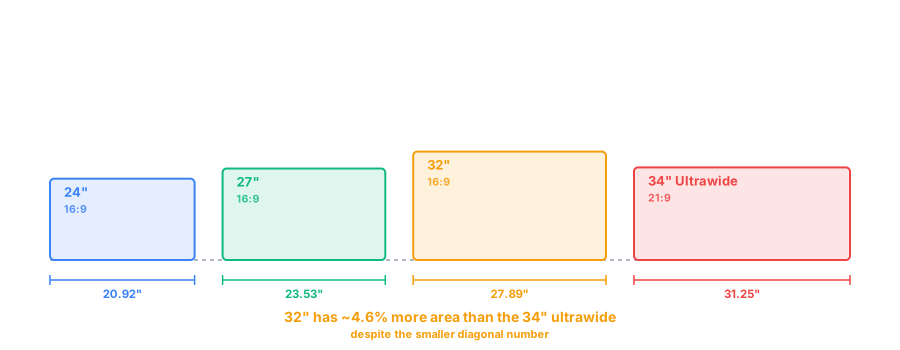
Best Monitor Sizes for Different Developers
Is a 24-Inch Monitor Good for Coding?
A 24-inch monitor is a perfectly capable primary screen, especially at 1080p, where text renders sharp without needing any scaling adjustments. It's compact enough to sit close on a shallow desk, inexpensive, and easy to pair as a second display if you already own a bigger primary monitor. The tradeoff is workspace: once you try to view an editor and a browser at the same time, both windows end up narrow enough that long lines of code or wide layouts start wrapping awkwardly.
It's a reasonable choice if your budget is tight, your desk is small, or you're planning to run dual 24-inch monitors instead of one larger screen — but if you're buying a single monitor and know you'll multitask often, it's usually worth stretching to 27 inches instead.
Is a 27-Inch Monitor Good for Coding?
Yes — this is the size most developers settle on, and for good reason. At 1440p, a 27-inch panel hits a pixel density around 109 PPI, sharp enough that text looks clean at a normal desk distance without turning on OS-level scaling. It's large enough to split into two reasonably comfortable panes — editor and terminal, or editor and browser — while still fitting on almost any desk without forcing you to sit unusually far back.
Some 27-inch monitors also come in 4K, pushing pixel density well past what most people can distinguish at arm's length. That's genuinely nice for text clarity, but it isn't strictly necessary at this size — 1440p already looks sharp, and 4K mainly adds cost and slightly higher GPU and scaling overhead rather than transforming the experience. See the exact numbers for your setup with our PPI and screen size tool, or check the full breakdown on the 27-inch monitor dimensions guide.
Is a 32-Inch Monitor Too Big for Coding?
Not too big, but it only pays off if you adjust two other things alongside it: resolution and viewing distance. A 32-inch monitor at 1440p has the same pixel grid as a 27-inch panel, just stretched over a larger area — meaning text and UI elements appear physically bigger rather than sharper, and pixel density actually drops to around 92 PPI. If you sit at the same distance you would from a 27-inch screen, that softness in text becomes noticeable.
The fix is usually one of two things: move up to 4K, which restores sharp text at 32 inches by roughly doubling the pixel count, or simply sit further back, which is why 32-inch monitors want a deeper desk than 24 or 27-inch panels. Done right, a 32-inch 4K monitor gives you genuinely more usable canvas — enough to comfortably fit three narrow panes instead of two — without looking blurry or oversized. Compare it directly against smaller options on the 27-inch vs 32-inch comparison page.
Are Ultrawide Monitors Good for Coding?
For certain workflows, ultrawide monitors are arguably the best option on this list. A 34-inch 21:9 ultrawide gives you enough width to run an editor and a browser, or a terminal and documentation, genuinely side by side — each half still roughly as wide as a standalone monitor, rather than a cramped split window. It's especially well suited to keeping an IDE open next to full-height documentation or a wide terminal without either one feeling squeezed.
Beyond 34 inches, 32:9 super-ultrawide monitors go a step further, effectively combining two 27-inch-equivalent screens into one panel with no bezel between them — useful if you'd otherwise run dual monitors and want them merged into one continuous surface. Curved ultrawide options help keep the far edges within a comfortable eye-line, since a flat panel that wide can otherwise feel like it's wrapping past your peripheral vision at close range.
Where a standard 16:9 monitor is still the better call: if you mostly work in one maximized window, use a laptop dock where a second monitor is easy to add instead, or need a shape that plays nicely with fullscreen presentation and screen-sharing tools that assume a conventional aspect ratio. Our 16:9 vs 21:9 comparison covers the tradeoff in more detail if you're deciding between the two.
Best Resolution for Coding
Resolution and screen size only tell the full story together — the same pixel count looks completely different depending on how large a panel it's spread across. 1080p is sharp and requires no scaling on a 24-inch monitor, but starts looking soft once stretched across 27 inches or more. 1440p is the current sweet spot for coding: sharp text at 27 inches without scaling, and still very usable at 32 inches. 4K delivers the crispest text of the three, especially valuable at 32 inches and above, but often needs OS scaling around 125–150% to keep UI elements a comfortable size rather than tiny.
The relationship that matters is size, resolution, and pixel density (PPI) together — a higher resolution alone doesn't guarantee sharper text if it's stretched across a bigger panel, and scaling settings can undo some of the sharpness gain if set too aggressively. If you want to see the actual PPI for a specific size-and-resolution combination before buying, our screen size and PPI calculator works it out instantly, and the PPI and text clarity explainer covers why pixel density matters more than raw resolution.
One Large Monitor vs Dual Monitors for Coding
Both setups can work equally well — the right one depends more on how you personally organize windows than on any technical advantage. A single large or ultrawide monitor removes the bezel gap between screens, so windows can span across the middle seamlessly, and window management is simpler since there's only one display to configure. It's also usually cheaper than two comparably sized monitors and takes up a single stand's worth of desk space.
Dual monitors give you a hard, physical break between apps, which some people find easier to context-switch around — your terminal is unambiguously "on the other screen," not just in another window. They're also easier to angle independently, useful if one screen is mainly for reference material. The main downsides are the bezel gap interrupting anything that spans both screens, more desk footprint, and slightly fiddlier cable and stand management. Neither approach is objectively better for coding specifically; it comes down to whether you'd rather have one continuous canvas or two clearly separated ones.
Recommended Monitor Size by Type of Programmer
- Beginner programmer: A 24-inch 1080p monitor is plenty while you're learning — save the upgrade budget until your workflow actually demands more space.
- Student: 24 or 27 inches, prioritizing portability and desk space if you're working from a dorm room or shared space over a laptop.
- Web developer: 27-inch at 1440p is a strong default, since you'll often want to preview a browser alongside your editor.
- Software developer: 27-inch for general work, or 32-inch/ultrawide if you regularly run an IDE, terminal, and documentation together.
- Data analyst: A 32-inch or ultrawide monitor pays off quickly here, since wide spreadsheets and dashboards benefit directly from extra horizontal space.
- Heavy multitasker: A 34-inch ultrawide or dual 27-inch setup, depending on whether you prefer one continuous canvas or a hard split between apps.
- Professional developer with a large desk: A 32-inch 4K or 34-inch-plus ultrawide, where the extra desk depth lets you sit far enough back to use the full size comfortably.
How Far Should You Sit From a Coding Monitor?
There's no single correct distance — it depends on screen size, resolution, and your own eyesight and comfort. As a general starting point, 24-inch monitors tend to feel right around 20–24 inches away, 27-inch monitors around 24–28 inches, and 32-inch or ultrawide displays around 28–34 inches. Higher resolutions give you a bit more flexibility to sit closer without text looking rough, since there are simply more pixels making up each character.
Rather than measuring out an exact distance, a more reliable test is comfort over a full workday: if you're leaning in to read text or squinting, you're either sitting too far back or your resolution and scaling need adjusting; if you have to move your head to see the edges of the screen, you're likely too close for its size. Our desk setup and viewing distance guide covers this in more detail across all common monitor sizes.
Frequently Asked Questions
Is 27 inches enough for coding?
Yes, for most programmers. A 27-inch monitor at 1440p is the most common recommendation for coding because it balances sharp text, a reasonably wide canvas, and a comfortable viewing distance without needing display scaling.
Is 32 inches better than 27 inches for programming?
Not automatically. A 32-inch monitor gives you more physical canvas, but only helps if you also increase resolution and sit further back — otherwise text ends up larger rather than sharper, without adding real workspace.
Is 4K worth it for coding?
Often yes on 27-inch and larger screens, where the extra pixel density makes text noticeably crisper. It's less essential on 24-inch monitors, where 1080p or 1440p already looks sharp at a normal desk distance.
Is an ultrawide monitor good for programming?
Very good for workflows built around having several things open at once, like an editor next to a browser or terminal. It's less useful if you mostly work in one maximized window, where the extra width goes unused.
Is 24 inches too small for coding?
Not too small, but limited. A 24-inch monitor works fine for single-file focus and fits almost any desk, though you'll likely want a second monitor once you start regularly running a browser, terminal, and editor side by side.
Is dual monitor better than one monitor for coding?
Both work well — dual monitors give you a clean break between apps and are often cheaper, while one large or ultrawide monitor removes the bezel gap and simplifies window management. Neither is objectively better across the board.
What resolution is best for programming?
1440p is the most balanced choice on a 27-inch monitor, offering sharp text without requiring scaling. 4K is worth it if you want extra screen real estate at 100% scaling or you're on a 32-inch or larger panel.
What monitor size is best for software developers?
27 inches at 1440p is the most common sweet spot, though developers who multitask heavily across an editor, terminal, and documentation often prefer a 32-inch or ultrawide display instead.