
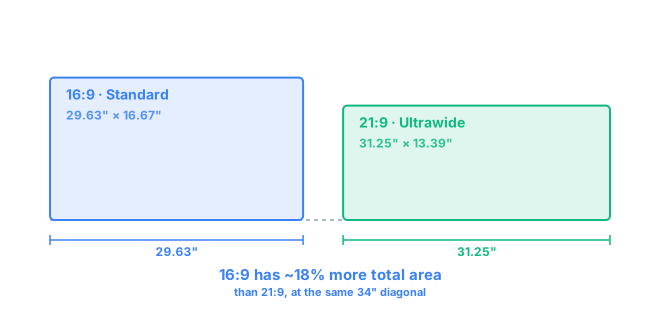
16:9 is the standard widescreen shape used by nearly every TV, laptop, and monitor since the 2000s. 21:9 is an ultrawide shape — noticeably longer and flatter, built to fit more side-by-side content on screen at once. Neither is "better" outright: 21:9 wins on horizontal workspace and immersion in supported games and movies, while 16:9 wins on compatibility, price, and — perhaps surprisingly — total screen area at the same diagonal size. Which one suits you comes down to what you actually do on the screen.
The real difference isn't the diagonal measurement, it's how that length gets divided between width and height. A 16:9 screen splits its diagonal into 16 parts width for every 9 parts height, landing close to a traditional rectangle. A 21:9 screen stretches the same idea to 21 parts width for 9 parts height, so at any given diagonal it reaches further sideways and falls shorter vertically. That's the entire practical story: more horizontal room to place windows next to each other, less vertical room per inch of panel you're paying for. The exact formula behind these numbers is on our methodology page.
16:9 vs 21:9 at a Glance
| 16:9 | 21:9 | |
|---|---|---|
| Aspect ratio | 1.78:1 (standard widescreen) | 2.33:1 (ultrawide) |
| Typical resolutions | 1920×1080, 2560×1440, 3840×2160 | 2560×1080, 3440×1440, 5120×1440 |
| Screen shape | Close to a traditional monitor or TV | Noticeably wider and flatter, panoramic |
| Horizontal workspace | Standard — one app comfortably, two if shrunk | Wide — two full apps side by side |
| Gaming | Broadest support, easiest to drive at high refresh | Immersive where supported; some titles letterbox it |
| Movies | Matches almost all streaming and TV content directly | Closer to cinema width, but not every source fills it |
| Productivity | Solid for single-app focus and general use | Strong for referencing, timelines, and multi-pane apps |
| Multitasking | Often needs a second monitor for real side-by-side work | Frequently replaces a two-monitor setup on its own |
| Compatibility | Universal — every app, game, and video assumes this shape | Very good, but occasional black bars or scaling quirks |
| Desk space | Fits most desks at standard viewing distances | Needs a wider desk; curved options help keep edges visible |
| Best suited for | General use, gaming, compact desks | Multitaskers, editors, sim and racing fans, wide desks |
What Does 16:9 Mean?
16:9 describes a rectangle that's 16 units wide for every 9 units tall — a 1.78:1 ratio. It became the default screen shape because television and film settled on it as a compromise between the old boxy 4:3 format and true cinema widescreen, and once TVs standardized on it, computer monitors, laptops, phones held sideways, and game engines all followed. That shared assumption is exactly why 16:9 remains the safest choice: nothing needs to be adjusted, cropped, or letterboxed to work with it.
Inside 16:9, resolution is really where the differences show up. 1920×1080 (1080p) is still the most common resolution on smaller and budget panels. 2560×1440 (1440p) is the sweet spot on 27-inch monitors, sharp enough for text and detailed work without needing display scaling. 3840×2160 (4K) pushes pixel density high enough that individual pixels become hard to spot at a normal desk distance, though it demands considerably more from your GPU to game at full resolution. You can check the exact width, height, and PPI for any of these combinations with our screen size and PPI tool.
What Does 21:9 Mean?
21:9 is the common shorthand for ultrawide monitors — technically closer to 2.33:1, though the name comes from rounding for simplicity. Instead of adding height the way a bigger 16:9 monitor would, a 21:9 screen adds almost all of its extra diagonal length as width, which is why two ultrawides that look similar on a spec sheet can feel very different in person depending on their actual resolution.
2560×1080 (often labeled UWFHD) is the entry point for ultrawide, typically on 29-inch panels. 3440×1440 (UWQHD) is the size most people mean when they say "ultrawide" today, common on 34-inch screens and offering a genuinely large jump in horizontal pixels over standard 1440p. Larger still, 5120×1440 effectively behaves like two 27-inch 1440p monitors fused into one panel with no bezel between them. This is also where diagonal size gets misleading fastest: a 34-inch ultrawide and a 32-inch standard monitor sound similar, but as the 32-inch vs 34-inch comparison shows, the 32-inch panel actually has slightly more total screen area, because so much of the ultrawide's diagonal is spent on width rather than height.
16:9 vs 21:9 for Gaming
Ultrawide gaming lives or dies on individual game support. When a title properly supports 21:9, the extra width becomes real peripheral vision — useful in racing games for spotting cars beside you, in flight sims for situational awareness, and in open-world RPGs for a more panoramic sense of place. Games that only patch in basic support sometimes just extend the HUD without extending the actual field of view, and games that don't support it at all will letterbox with black bars on either side, effectively turning your ultrawide into a smaller 16:9 screen anyway.
Competitive and esports players tend to stick with 16:9, and not just out of habit. Many competitive shooters cap field of view or ban ultrawide resolutions outright to keep the playing field level, and even where it's allowed, driving a 3440×1440 panel at high frame rates asks noticeably more of your GPU than 2560×1440 does — roughly 33% more pixels to render for the same settings. If your priority is maximum frame rate and guaranteed support across every game you play, 16:9 is still the safer bet; for genre fans of racing, flight, and immersive single-player games, ultrawide is a genuine upgrade. Our gaming monitor size guide breaks this down further by genre.
16:9 vs 21:9 for Productivity
This is where ultrawide tends to earn its keep. Splitting a 21:9 screen in half still leaves each side roughly as wide as a standalone monitor, so a code editor and a browser, or a terminal and documentation, can sit next to each other without either one feeling squeezed — see our best monitor size for coding guide if that's specifically what you're shopping for. On a 16:9 screen, the same split leaves both halves narrower, which starts to matter once you're reading long lines of code or a wide spreadsheet.
Spreadsheets with many columns, research with a document and multiple browser tabs, and video editing timelines all benefit from the same principle: more usable width means less scrolling and fewer alt-tabs. Some ultrawide owners still keep a second monitor for chat or reference material, but plenty of others use the width to fully retire a dual-monitor setup, trading a bezel down the middle for one continuous canvas. If your work is more single-focus — writing, browsing, general admin — the extra width of 21:9 goes mostly unused, and a 16:9 screen at a sharper resolution can be the more practical choice.
16:9 vs 21:9 for Movies and Video
Streaming and broadcast video is shot and mastered almost entirely in 16:9, so on a 16:9 screen it fills the frame edge to edge by default. On a 21:9 screen, that same content gets black bars on the left and right, or gets displayed smaller with bars on all four sides if a service doesn't offer a "fill" option.
Where 21:9 pulls ahead is with true cinematic content: many theatrical films are shot at 2.39:1 or 2.35:1, which is wider than even standard ultrawide. A 21:9 screen fits that footage with much thinner bars than a 16:9 screen would, and some ultrawide owners specifically buy one to get closer to a "letterbox-free" movie night. Just don't expect 21:9 to eliminate black bars altogether — it shifts which content fits perfectly and which doesn't, rather than solving the mismatch for everything.
Which Should You Choose?
Choose 16:9 if you:
- Want the widest possible compatibility with games, apps, and video
- Play competitive or esports titles that don't properly support ultrawide
- Watch mostly standard streaming and broadcast content
- Prefer a more conventional monitor size and desk footprint
Choose 21:9 if you:
- Want meaningfully more horizontal workspace for multitasking
- Regularly edit video, work with timelines, or reference multiple documents
- Play racing, flight, or open-world games that support the wider view
- Have the desk space and GPU headroom, and want a wider, more immersive desktop
Still not sure how the numbers actually stack up for the specific sizes you're considering? Use the Visual Size Comparison tool to overlay any two monitors — including mixed aspect ratios like these — to scale, or browse the full monitor comparison library for more size-specific match-ups.
Frequently Asked Questions
Is 21:9 better than 16:9?
Neither is universally better — they trade off differently. 21:9 gives you more horizontal workspace and a more panoramic feel in supported games and movies. 16:9 gives you broader compatibility, easier GPU demands, and more total screen area at the same diagonal size.
Is 21:9 good for gaming?
It's great in racing, flight, and open-world games that support the wider field of view, but a step down for competitive shooters that lock to 16:9 or letterbox the extra width instead of using it.
Is 21:9 better for productivity?
For most multitasking-heavy work, yes. The extra width fits a code editor and browser, or two documents, side by side without either window feeling cramped, often replacing a second monitor entirely.
Can a 21:9 monitor display 16:9 content?
Yes. A 21:9 screen shows 16:9 video or games with black bars on the left and right rather than stretching or cropping the image, unless the software specifically supports the wider ratio.
Is 3440×1440 better than 2560×1440?
3440×1440 is a 21:9 ultrawide resolution with noticeably more horizontal pixels than the standard 16:9 2560×1440, so it's "better" for workspace and immersion, not sharpness — both sit at a similar pixel density on a comparably sized panel.
Does 21:9 require more GPU power?
Usually, yes. A 3440×1440 ultrawide has about 33% more pixels to render than a 2560×1440 16:9 screen, so expect a similar frame-rate hit to moving up a resolution tier.
Should I buy a 16:9 or 21:9 monitor?
Buy 16:9 if you want the widest compatibility, play mostly competitive or unsupported games, or have a shallow desk. Buy 21:9 if you multitask constantly, edit video, or mainly play games and watch content that actually supports the wider frame.