
Which Should You Buy: 32-Inch or 34-Inch?
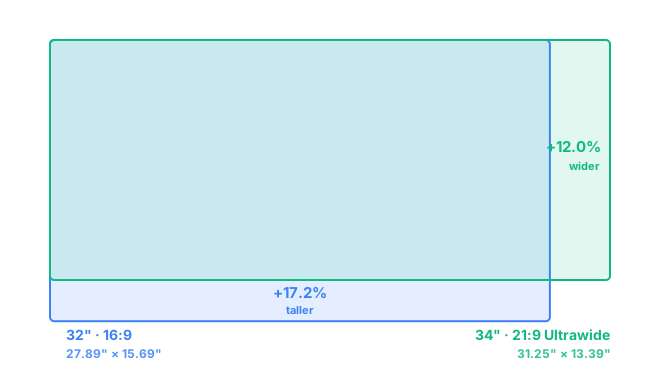
A 32-inch monitor actually has more total screen area than a 34-inch ultrawide — 437.6 in² vs. 418.4 in² (about 4.6% more) — because most 34-inch monitors use a 21:9 ultrawide ratio, not 16:9. The 34-inch is 3.36" wider (31.25" vs. 27.89"), but the 32-inch is 2.30" taller (15.69" vs. 13.39"). Choose 34-inch ultrawide for cinematic width and side-by-side multitasking; choose 32-inch for extra vertical space and broader game/app compatibility.
Diagonal size alone can be misleading once aspect ratios differ — a bigger diagonal number doesn't guarantee a bigger screen. Here, the "smaller" 32-inch panel covers more physical area than the "bigger" 34-inch ultrawide, purely because it keeps the taller 16:9 shape instead of trading height for width.
32-Inch vs 34-Inch for Work and Multitasking
The extra height on the 32-inch pays off most in anything you scroll through vertically — long documents, spreadsheets with many rows, or a tall code file. The 34-inch ultrawide flips that trade: its width comfortably fits two full-size windows side by side, like an editor and a browser, without either one feeling squeezed. If your work is mostly one tall document at a time, the 32-inch wins; if you regularly want two things open side by side, the ultrawide usually feels roomier day to day. Our best monitor size for coding guide goes deeper on this exact trade-off.
32-Inch vs 34-Inch for Gaming
A 32-inch 16:9 panel has the wider game and driver support — every title assumes this shape, and it's easier to push high frame rates since there are fewer pixels to render at 1440p. The 34-inch 21:9 ultrawide trades some of that compatibility for a more immersive field of view in racing, flight, and open-world games that properly support the wider ratio; unsupported titles will letterbox down to a smaller effective picture instead. Competitive players who want maximum compatibility and frame rate tend to lean 32-inch; sim and open-world fans tend to lean ultrawide. See the fuller breakdown on 16:9 vs 21:9 if you're weighing the aspect ratio itself.
Resolution: 1440p at Each Size
Both sizes are commonly sold at 1440p, just with a different pixel count to match their shape. A 32-inch at standard 2560×1440 works out to about 92 PPI. A 34-inch ultrawide at 3440×1440 has more horizontal pixels for the extra width, landing around 110 PPI — noticeably sharper text than the 32-inch at the same nominal resolution tier. If text sharpness matters more to you than the trade-offs above, that PPI gap is worth factoring in; a 32-inch at 4K (3840×2160) jumps to about 138 PPI, well past the ultrawide. Check any combination with the PPI calculator.
Desk Space and Viewing Distance
The 34-inch ultrawide needs about 3.4 inches more desk width, so measure your desk before committing to it if space is tight. The 32-inch needs about 2.3 inches more vertical clearance instead, which mostly affects how high your eye line sits relative to the top of the screen rather than desk footprint. Both sizes are comfortable at a typical 28–34 inch viewing distance; curved versions of the 34-inch ultrawide help keep its far edges within a natural eye line at that distance, which a flat panel that wide doesn't quite manage. See exactly how these figures are calculated on the methodology page.
Frequently Asked Questions
Is a 34-inch monitor bigger than a 32-inch monitor?
Not in total screen area. A 34-inch ultrawide is about 3.36 inches wider than a 32-inch monitor, but the 32-inch is about 2.3 inches taller — and ends up with roughly 4.6% more screen area overall, since it keeps a 16:9 shape instead of 21:9.
Why does a 32-inch monitor have more screen area than a 34-inch one?
Because most 34-inch monitors are 21:9 ultrawide, which trades height for extra width. A 32-inch monitor is usually 16:9, so it stays taller — and that added height outweighs the ultrawide's extra width.
Which is better for productivity, 32-inch or 34-inch?
A 32-inch 16:9 monitor gives more vertical room, which helps with coding, documents, and spreadsheets. A 34-inch ultrawide gives more horizontal room, which suits side-by-side windows without a bezel gap in the middle.
Does a 34-inch monitor need more desk space than a 32-inch monitor?
In width, yes — expect roughly 3.4 more inches of desk width for the 34-inch ultrawide. But the 32-inch needs about 2.3 inches more vertical clearance, since it's the taller of the two.