
Which Should You Buy: 27-Inch or 32-Inch?
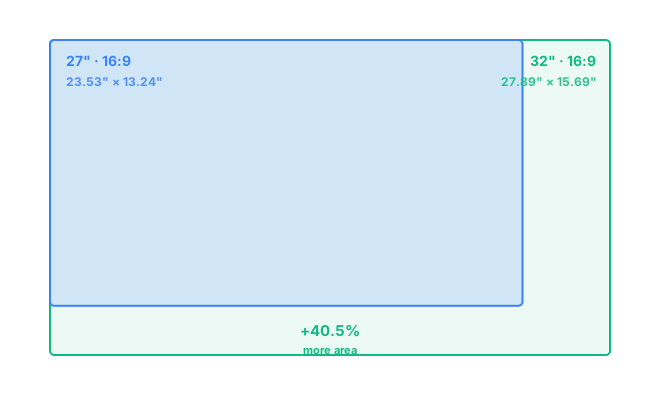
A 32-inch monitor has significantly more usable screen space than a 27-inch one: about 40.5% more area (437.7 in² versus 311.6 in²), spread across both extra width and extra height since both keep the same 16:9 shape. Choose 32 inches if you want a genuinely bigger canvas for work or immersive gaming. Choose 27 inches if you'd rather keep desk depth reasonable, spend less, or run a sharper 1440p image without pushing your GPU as hard.
At the same 16:9 aspect ratio, a 27-inch screen measures 23.53 by 13.24 inches, and a 32-inch measures 27.89 by 15.69 inches. That's 4.36 inches more width and 2.45 inches more height, worked out directly from each diagonal rather than taken from a manufacturer's spec sheet.
How Much Bigger Is a 32-Inch Monitor, Really?
Jumping from 27 to 32 inches sounds like a modest step up on paper, just a five-inch difference in diagonal size. But that five inches represents an 18.5% increase in diagonal length, and it translates into a 40.5% increase in actual screen area. The reason is simple geometry: area grows with the square of the diagonal, so even a moderate jump in size adds up to a bigger visual difference than the inch count alone suggests.
27-Inch vs 32-Inch for Work and Multitasking
A 32-inch monitor genuinely changes how comfortable multi-window work feels. Two full documents, or three narrower panels, can sit side by side without anything feeling cramped, and spreadsheets with a lot of columns stop requiring constant horizontal scrolling. A 27-inch monitor still manages two-window layouts well, but a 32-inch screen is where multitasking starts to feel closer to using two separate monitors rather than one wide one. The tradeoff is desk space: a 32-inch monitor needs a bit more depth to keep the whole screen within a comfortable field of view.
27-Inch vs 32-Inch for Gaming
For gaming, 27 inches remains the size most people settle on, and there's a reason for that: it's large enough to feel immersive but small enough to drive at high frame rates without an expensive GPU. A 32-inch monitor rewards slower-paced, story-driven, and open-world games where the bigger canvas adds to the atmosphere, but competitive players often find it less practical, since covering the extra area at high refresh rates asks more of your hardware, and the wider field of view can work against fast target tracking.
Resolution: 1440p or 4K at Each Size?
Pixel density is the main reason resolution choice shifts between these two sizes. A 27-inch monitor at 1440p lands around 109 PPI, a sharp, comfortable middle ground that doesn't need display scaling. Put that same 1440p resolution on a 32-inch panel and PPI drops to about 92, noticeably softer, especially on small text. That's why 32-inch monitors are increasingly sold at 4K instead, which brings pixel density up to roughly 138 PPI, sharper than a 27-inch monitor at 1440p, though it also asks more of your graphics card to render.
Desk Space and Viewing Distance
A 27-inch monitor is comfortable at 24 to 32 inches of viewing distance, which fits most standard desks without any adjustment. A 32-inch monitor is happier a bit further back, generally 28 to 36 inches, so it rewards a deeper desk or a monitor arm that lets you push it back slightly. Sitting too close to a 32-inch screen is the most common complaint people have after upgrading, not the size itself, so it's worth measuring your actual desk depth before deciding. Full formulas on the methodology page — or test your own desk and distance in the comparison tool.
Frequently Asked Questions
Is a 32-inch monitor a lot bigger than a 27-inch monitor?
Yes. A 32-inch monitor is about 4.4 inches wider and 2.5 inches taller than a 27-inch monitor, which adds up to roughly 40.5% more total screen area, even though the diagonal only grew by 18.5%.
Should I get 1440p or 4K on a 32-inch monitor?
4K is the sharper match. 1440p on a 32-inch panel works out to about 92 PPI, similar to a 24-inch monitor at 1080p, while 4K brings pixel density up to roughly 138 PPI, closer to what a 27-inch monitor delivers at 1440p.
Is 32 inches too big for a single monitor on a desk?
Not usually, as long as your desk is at least 28 to 30 inches deep. Sitting too close is the main issue with a 32-inch screen, not the size itself, since it needs more viewing distance than a 27-inch monitor to stay comfortable.
Which size is better for gaming, 27-inch or 32-inch?
27 inches remains the more balanced choice for most gamers, easier to drive at high frame rates and still plenty immersive. 32 inches suits slower-paced, single-player, and open-world games where the extra screen area adds to the experience.
Do I need a stronger GPU for a 32-inch monitor than a 27-inch one?
Only if you push resolution higher along with it. A 32-inch monitor at 4K needs meaningfully more GPU power than a 27-inch monitor at 1440p, though at matched resolution and refresh rate the demand on your hardware is about the same.