
Quick Answer
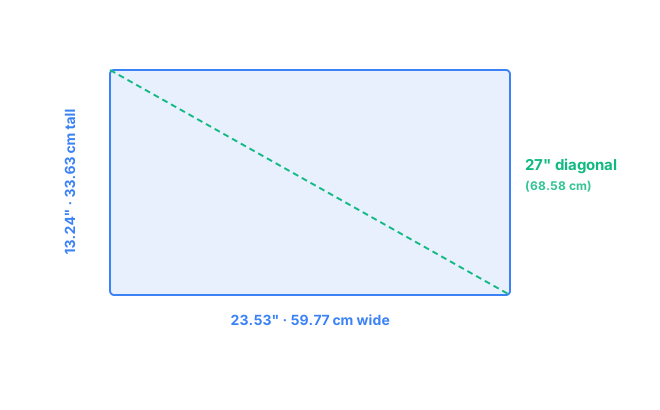
A 27-inch monitor at the standard 16:9 aspect ratio measures 23.53" wide × 13.24" tall (59.77 cm × 33.63 cm), with a diagonal of exactly 27" (68.58 cm) and a screen area of about 311.5 in² (2,010 cm²). At 1440p — the most common resolution for this size — that works out to roughly 109 pixels per inch, the sharpness sweet spot most people settle on for this screen size.
Interactive Size Comparison
Want to see a 27-inch monitor to scale against your desk, another monitor, or a laptop you already own? The free visualizer lets you overlay exact measurements and compare sizes side by side.
Open the size visualizer →27" 16:9 Dimensions in Inches
Monitor sizes are always measured diagonally, corner to corner — the "27 inch" refers only to that diagonal, not the width or height on their own. At the standard 16:9 aspect ratio used by virtually all 27-inch monitors, applying the Pythagorean theorem to the diagonal gives a screen width of 23.53 inches and a height of 13.24 inches.
| Measurement | Value |
|---|---|
| Diagonal | 27.00" |
| Width | 23.53" |
| Height | 13.24" |
| Screen area | ~311.5 in² |
27" 16:9 Dimensions in Centimeters
For anyone shopping or measuring in metric, the same 27-inch screen converts to 59.77 cm wide × 33.63 cm tall, with a 68.58 cm diagonal — useful for checking desk fit or shipping dimensions listed by international retailers.
| Measurement | Value |
|---|---|
| Diagonal | 68.58 cm |
| Width | 59.77 cm |
| Height | 33.63 cm |
| Screen area | ~2,010 cm² |
Comparison Visual
1080p / 1440p / 4K PPI on a 27" Screen
Pixel density (PPI) tells you how sharp text and images look, and it's one of the most-searched questions for this size — because a 27-inch panel is large enough that resolution choice actually matters. The same 27-inch screen looks noticeably different depending on how many pixels are packed into it:
| Resolution | Pixel count | PPI |
|---|---|---|
| 1080p (Full HD) | 1920 × 1080 | ~81.6 |
| 1440p (QHD) | 2560 × 1440 | ~108.8 |
| 4K (UHD) | 3840 × 2160 | ~163.2 |
1080p on a 27-inch screen sits below 90 PPI, which is on the low side for this size — text and icons can look visibly soft up close. 1440p is the size's sweet spot at roughly 109 PPI, sharp enough for daily use without requiring any display scaling. 4K reaches about 163 PPI — genuinely crisp, but at 27 inches most people need to set their OS display scaling to around 125–150% to keep text a comfortable reading size, since the pixels themselves become quite small.
Desk-Space Considerations
A 27-inch monitor is comfortable at a viewing distance of roughly 20 to 30 inches, measured from your eyes to the screen. To sit at that distance without feeling cramped, aim for at least 24 to 30 inches of desk depth — enough room for the monitor's stand footprint (typically 7 to 9 inches front-to-back) plus your normal seating position behind it.
If desk depth is tight, a VESA monitor arm can reclaim several inches by mounting the screen closer to the wall and eliminating the stand's base entirely. Also leave a couple of inches of clearance behind the monitor for cable routing and airflow, especially if the panel has built-in speakers or a fan. Comparing against a different size? See 24" vs 27" or 27" vs 32" to scale.
Frequently Asked Questions
What is the width and height of a 27-inch monitor?
A standard 27-inch 16:9 monitor measures 23.53 inches wide and 13.24 inches tall (59.77 cm by 33.63 cm), calculated directly from the 27-inch diagonal at a 16:9 aspect ratio.
How big is a 27-inch monitor in centimeters?
A 27-inch monitor is about 68.58 cm diagonally, with a screen measuring roughly 59.77 cm wide by 33.63 cm tall at the standard 16:9 aspect ratio.
Is 1440p or 4K better on a 27-inch monitor?
1440p is the more common sweet spot on 27 inches, giving about 109 PPI without needing OS scaling. 4K reaches about 163 PPI, sharper but usually requires 125-150% scaling in Windows or macOS to keep text a comfortable size.
How much desk space do I need for a 27-inch monitor?
Allow at least 24 to 30 inches of desk depth for a comfortable 20 to 30 inch viewing distance, plus a few inches behind the monitor for stand clearance or cable routing. A VESA arm can reduce the footprint if desk depth is tight.