
Which Should You Buy: 24-Inch or 27-Inch?
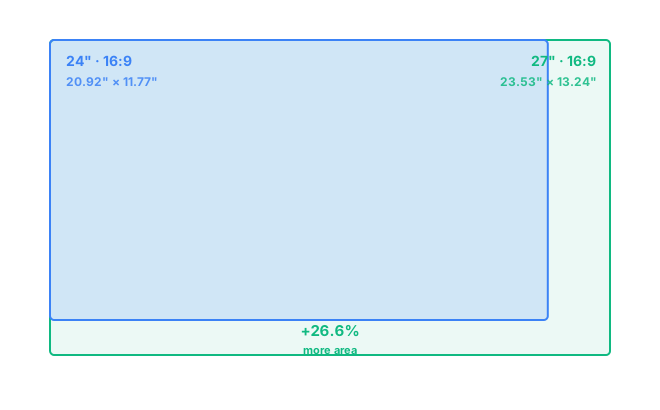
A 27-inch monitor gives you noticeably more usable screen space than a 24-inch one: about 26.6% more area (311.5 in² versus 246.1 in²), gained proportionally in both width and height since both share the same 16:9 shape. Go with 27 inches if the extra screen space is worth a bit more desk depth. Stick with 24 inches if you want a compact footprint, a lower price, or the sharpest text at 1080p.
At the same 16:9 aspect ratio, a 24-inch screen measures 20.92 by 11.77 inches, and a 27-inch measures 23.53 by 13.24 inches. That's 2.62 inches more width and 1.47 inches more height, worked out directly from each diagonal using standard aspect-ratio geometry rather than pulled from a spec sheet.
How Much Bigger Is a 27-Inch Monitor, Really?
It's easy to assume the size difference between 24 and 27 inches is small, since the diagonal only grows by three inches. But screen area doesn't scale the same way diagonal size does. Going from 24 to 27 inches is a 12.5% increase in diagonal length, yet it works out to a 26.6% increase in usable screen area, because area scales with the square of the diagonal, not the diagonal itself. That gap is why two monitors that look close on a spec sheet can feel surprisingly different once they're actually sitting on your desk.
24-Inch vs 27-Inch for Work and Multitasking
For spreadsheets, documents, and general office work, that extra screen area on a 27-inch monitor adds up fast. You get more comfortable room for two windows side by side without shrinking text or zooming out to fit everything. A 24-inch screen can still handle split-screen work, but each window ends up noticeably narrower, and that starts to matter once you're comparing long documents or wide spreadsheets. If side-by-side referencing is a big part of your day, 27 inches is usually the size people land on before jumping to an ultrawide.
24-Inch vs 27-Inch for Gaming
Gaming preference tends to split by genre more than by any fixed rule. Competitive and fast-paced shooters often lean toward 24-inch monitors, since a smaller screen keeps everything within a tighter field of view and is easier to drive at high refresh rates like 240Hz. Slower-paced, single-player, and open-world games tend to benefit more from the extra size of a 27-inch screen, which adds a sense of immersion without demanding the desk depth or GPU power that a 32-inch or ultrawide setup would.
Resolution: 1080p or 1440p at Each Size?
Screen size and resolution are more connected than most people realize, because pixel density, measured in pixels per inch, changes with both. A 24-inch monitor at 1080p sits around 92 PPI, which looks sharp and needs no display scaling. Stretch that same 1080p resolution across a 27-inch panel and PPI drops to roughly 82, still usable but noticeably softer, especially on text. That's part of why most 27-inch monitors ship at 1440p instead: it brings pixel density back up to about 109 PPI, close to the sharpness of a 24-inch screen at 1080p, but with meaningfully more usable space.
Desk Space and Viewing Distance
Neither size demands a dramatically different setup, but the gap is enough to matter on a shallow desk. A 24-inch monitor stays comfortable from as little as 20 inches away, which suits smaller desks or tight corner setups. A 27-inch monitor is happier at 24 to 32 inches of viewing distance. If your desk is under 24 inches deep, or your monitor tends to sit close to your face, 24 inches may end up the more comfortable choice, regardless of the extra area a 27-inch offers. See exactly how these figures are calculated on the methodology page, or try your own numbers in the comparison tool.
Frequently Asked Questions
Is a 27-inch monitor noticeably bigger than a 24-inch monitor?
Yes, though it depends on how you measure it. A 27-inch monitor is about 2.6 inches wider and 1.5 inches taller than a 24-inch monitor, adding up to roughly 26.6% more total screen area, even though the diagonal size only grew by 12.5%.
Should I get 1080p or 1440p on a 27-inch monitor?
1440p is the better match. Stretching 1080p across a 27-inch panel drops pixel density to about 82 PPI, noticeably softer than the same resolution on a 24-inch screen, while 1440p brings sharpness back up to a comfortable level.
Is 24 inches too small for a monitor in 2026?
Not at all. 24 inches remains a common, practical size for compact desks, budget builds, and anyone who prefers the sharpest possible text at 1080p without needing display scaling.
Which size is better for gaming, 24-inch or 27-inch?
24-inch monitors are popular for competitive and fast-paced games because they're easier to drive at high refresh rates and keep your view tightly framed. 27-inch monitors suit single-player and open-world games, where the extra size adds immersion.
Do I need to sit further back from a 27-inch monitor?
A little. A 24-inch monitor is comfortable from about 20 inches away, while a 27-inch monitor is better suited to 24 to 32 inches of viewing distance, so it's worth measuring your desk before upgrading.