
Quick Answer
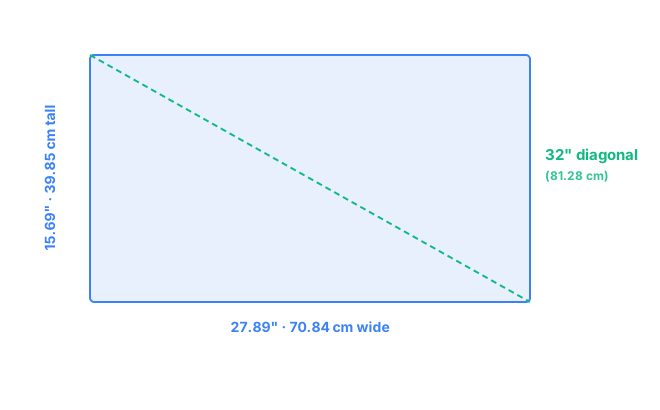
A 32-inch monitor at the standard 16:9 aspect ratio measures 27.89" wide × 15.69" tall (70.84 cm × 39.85 cm), with a diagonal of exactly 32" (81.28 cm) and a screen area of about 437.6 in² (2,823 cm²). At 4K, that works out to roughly 138 pixels per inch, sharp enough for most people to run at or near full scaling without straining to read text.
Interactive Size Comparison
Want to see a 32-inch monitor to scale against your desk, another monitor, or a laptop you already own? The free visualizer lets you overlay exact measurements and compare sizes side by side.
Open the size visualizer →32" 16:9 Dimensions in Inches
A monitor's advertised size is always its diagonal measurement, corner to corner, so "32 inch" on its own doesn't tell you the actual width or height you'll need to plan around. At the standard 16:9 aspect ratio used by nearly all 32-inch monitors, that diagonal works out to a screen width of 27.89 inches and a height of 15.69 inches. Knowing these two numbers separately matters most when you're checking whether a monitor arm, wall mount, or existing desk shelf can actually hold the panel, since product listings often advertise only the diagonal.
| Measurement | Value |
|---|---|
| Diagonal | 32.00" |
| Width | 27.89" |
| Height | 15.69" |
| Screen area | ~437.6 in² |
32" 16:9 Dimensions in Centimeters
In metric terms, the same 32-inch screen converts to 70.84 cm wide × 39.85 cm tall, with an 81.28 cm diagonal. These figures are useful when checking product listings from international retailers or confirming a monitor will actually fit a desk or shelf measured in centimeters.
| Measurement | Value |
|---|---|
| Diagonal | 81.28 cm |
| Width | 70.84 cm |
| Height | 39.85 cm |
| Screen area | ~2,823 cm² |
Comparison Visual
1080p / 1440p / 4K PPI on a 32" Screen
At 32 inches, resolution choice matters more than it does on smaller screens, since the same pixel count is stretched across a larger surface. Pixel density (PPI) is the number most people search for when trying to decide which resolution to buy.
| Resolution | Pixel count | PPI |
|---|---|---|
| 1080p (Full HD) | 1920 × 1080 | ~68.8 |
| 1440p (QHD) | 2560 × 1440 | ~91.8 |
| 4K (UHD) | 3840 × 2160 | ~137.7 |
1080p on a 32-inch screen drops below 70 PPI, low enough that individual pixels become visible at a normal desk distance, so it's generally not recommended for this size. 1440p improves things to roughly 92 PPI, usable but still on the softer side for text-heavy work like spreadsheets or dense code. 4K is the size most people land on, at about 138 PPI. That's sharp enough to run at or close to 100% display scaling on most operating systems, which is a real advantage over smaller 4K monitors that often need heavier scaling to keep text readable. For gaming or video editing where frame rate matters more than pixel density, 1440p at 32 inches is still a perfectly reasonable choice, since the resolution gap is far less noticeable during motion than it is with static text.
Desk-Space Considerations
A 32-inch monitor is comfortable at a viewing distance of roughly 25 to 35 inches, a bit farther back than a 27-inch screen needs. To sit at that distance without feeling boxed in, plan for at least 26 to 32 inches of desk depth, accounting for the stand's footprint plus your normal seating position.
Width matters here too, more than it does with smaller monitors. At nearly 28 inches wide, a 32-inch screen needs roughly 30 inches of clear desk width to sit comfortably without crowding the edges or bumping into a second monitor in a multi-screen setup. A VESA arm can help on both fronts, freeing up depth by mounting closer to the wall and making it easier to angle the screen if desk width is tight. It's also worth checking eye-level height before buying a fixed stand. A 32-inch panel sits noticeably taller than a 24 or 27-inch screen, and without height adjustment the top edge can end up above a comfortable line of sight, which tends to strain the neck over long sessions. See how it stacks up against other sizes on 27" vs 32" or 32" vs 34".
Frequently Asked Questions
What is the width and height of a 32-inch monitor?
A standard 32-inch 16:9 monitor measures 27.89 inches wide and 15.69 inches tall (70.84 cm by 39.85 cm), calculated from the 32-inch diagonal at a 16:9 aspect ratio.
How big is a 32-inch monitor in centimeters?
A 32-inch monitor is about 81.28 cm diagonally, with a screen measuring roughly 70.84 cm wide by 39.85 cm tall at the standard 16:9 aspect ratio.
Is 1440p or 4K better on a 32-inch monitor?
4K is generally the better fit on 32 inches, landing around 138 PPI, sharp enough for most people to use at or near 100% scaling. 1440p is still usable at about 92 PPI, but text and small details look noticeably softer than on smaller screens at the same resolution.
How much desk space do I need for a 32-inch monitor?
Plan for at least 26 to 32 inches of desk depth to get a comfortable 25 to 35 inch viewing distance, and roughly 30 inches of desk width to give the wider screen room to sit without crowding the edges.