
Quick Answer
If you've ever worked with two monitors and gotten tired of the bezel gap splitting your windows in half, a 34-inch ultrawide is usually what people mean when they ask about this size. Unlike most monitors, it isn't 16:9. It's 21:9, measuring 31.25" wide × 13.39" tall (79.38 cm × 34.01 cm), with a 34" diagonal (86.36 cm) and about 418.4 in² (2,700 cm²) of screen. It's noticeably wider and shorter than a standard monitor of the same diagonal, which is exactly the point.
Interactive Size Comparison
Ultrawides are the size people are most anxious about buying sight unseen, since 34 inches sounds enormous until you realize the height barely changes. See it laid over your actual desk measurements before you commit.
Open the size visualizer →34" 21:9 Dimensions in Inches
This is the detail that trips people up most when comparing listings: a "34 inch" ultrawide and a "34 inch" standard monitor are not the same shape, even though the diagonal number matches. A regular 16:9 panel at 34 inches would be roughly 29.6 inches wide. An ultrawide stretches that same diagonal into a much wider, shorter rectangle instead, at 31.25 inches wide by 13.39 inches tall. That shift toward width and away from height is the whole appeal of the format.
| Measurement | Value |
|---|---|
| Diagonal | 34.00" |
| Width | 31.25" |
| Height | 13.39" |
| Screen area | ~418.4 in² |
34" 21:9 Dimensions in Centimeters
In metric, the panel works out to 79.38 cm wide by 34.01 cm tall, with an 86.36 cm diagonal. If you're eyeing a desk or shelf listed in centimeters, the width is the number that actually decides whether it fits. The height is short enough that it rarely causes problems on its own.
| Measurement | Value |
|---|---|
| Diagonal | 86.36 cm |
| Width | 79.38 cm |
| Height | 34.01 cm |
| Screen area | ~2,700 cm² |
Comparison Visual
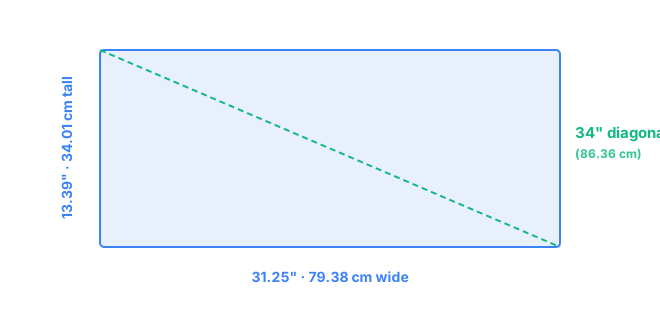
Seeing the shape helps more than the numbers alone. A 34-inch ultrawide looks less like a bigger monitor and more like a letterbox, wide enough to feel cinematic but short enough to sit lower on a desk than people expect from a "big" screen.
Resolution & PPI on a 34" Ultrawide Screen
Ultrawides don't use the 1080p, 1440p, 4K ladder you'd see on a standard monitor, since the pixel grid has to match the 21:9 shape. The three resolutions actually sold at 34 inches are 2560x1080, 3440x1440, and 5120x2160, and the middle option has become the de facto standard for a reason.
| Resolution | Common name | PPI |
|---|---|---|
| 2560 × 1080 | UWFHD | ~81.7 |
| 3440 × 1440 | UWQHD | ~109.7 |
| 5120 × 2160 | UW5K | ~163.4 |
3440x1440 lands right around 110 PPI, sharp enough for daily use without any scaling adjustments, and it's what the overwhelming majority of 34-inch ultrawides ship with. 2560x1080 saves money but looks noticeably softer, closer to what you'd tolerate on an older monitor rather than choose on purpose. 5120x2160 is the enthusiast tier, gorgeous but demanding on a graphics card, since it's pushing nearly as many pixels as two 4K monitors combined.
Desk-Space Considerations
The anxiety with ultrawides is almost never height. It's whether 31.25 inches of width will actually clear your desk without crowding a keyboard, speakers, or a second display. Most desks between 40 and 48 inches wide handle it fine, but if you're working in a smaller space or a corner setup, measure before you buy rather than trusting the box.
Curvature adds a second wrinkle most people don't think about until the monitor arrives. The majority of 34-inch ultrawides curve around 1500R to 1800R, which pulls the edges slightly forward toward you compared to a flat panel. That's genuinely more comfortable at close range, since your eyes travel a shorter distance to the far edges, but it also means the monitor needs a little more desk depth than its flat height alone suggests. A viewing distance of roughly 24 to 32 inches tends to feel right for most people at this size and curve. See how curvature is factored into these numbers on the methodology page, or compare against a standard panel on 27" vs 34".
Frequently Asked Questions
Is a 34-inch ultrawide the same as two monitors side by side?
Roughly, yes, in usable width. A 34-inch ultrawide is about 31.25 inches wide, close to what two 16-inch-wide monitors would offer together, but as one continuous screen with no bezel gap down the middle.
Will a 34-inch ultrawide monitor fit on a normal desk?
Most standard desks, at least 40 to 48 inches wide, will fit a 34-inch ultrawide comfortably, since the screen itself is only 31.25 inches across. The more common surprise is depth, since curved models need a bit more clearance to sit at their intended viewing angle.
What resolution should I get for a 34-inch ultrawide?
3440x1440 (UWQHD) is the standard choice at 34 inches, landing around 110 PPI with no scaling headaches. 2560x1080 is sharper on the wallet but noticeably softer at about 82 PPI, and 5120x2160 exists at the premium end for closer to 163 PPI.
Is a 34-inch ultrawide monitor curved or flat?
The large majority of 34-inch ultrawides are curved, usually around a 1500R to 1800R curvature, since the extreme width makes a flat panel harder to view evenly edge to edge at a normal desk distance.