
Which Should You Buy: 27-Inch or 34-Inch?
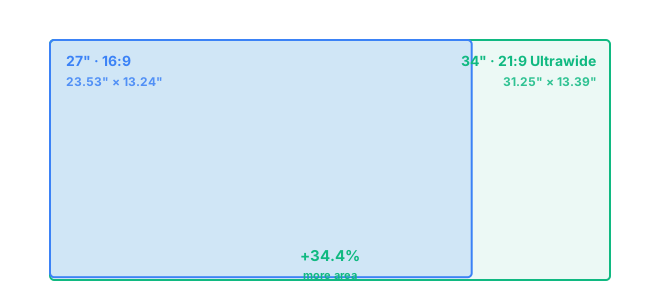
A 34-inch ultrawide monitor has noticeably more usable screen space than a 27-inch monitor: about 34.4% more area (418.6 in² versus 311.5 in²), almost entirely from extra width rather than height. The 34-inch is only 0.16 inches taller than the 27-inch, since it trades vertical space for its 21:9 shape, but it's 7.72 inches wider. Choose 34-inch if you want dramatically more horizontal room for side-by-side windows or wide-format gaming. Choose 27-inch if you'd rather keep the taller, more traditional 16:9 shape that most software is designed around.
A 27-inch monitor at 16:9 measures 23.53 by 13.24 inches. A 34-inch ultrawide at 21:9 measures 31.25 by 13.39 inches. The height barely changes between the two, just 0.16 inches, while the width grows by 7.72 inches, which is why a 34-inch ultrawide feels like a different shape of monitor entirely rather than simply a bigger version of a 27-inch screen.
How Much Bigger Is a 34-Inch Ultrawide, Really?
Diagonal size alone undersells what's happening here. A 34-inch screen is a 25.9% jump over 27 inches in diagonal terms, but because the ultrawide trades height for width instead of growing evenly in both directions, the real story is in the shape, not just the size. The result is 34.4% more total screen area, almost all of it added to the sides rather than the top and bottom, which feels very different from a monitor that simply scaled up.
27-Inch vs 34-Inch for Work and Multitasking
This is where the shape difference matters most. A 34-inch ultrawide can fit two or three full windows side by side without any of them feeling squeezed, which makes it genuinely useful for comparing documents, monitoring dashboards, or running a browser and an editor next to each other with room to spare. A 27-inch monitor handles two windows fine but starts to feel tight with three. What a 34-inch ultrawide doesn't give you is more vertical space, so if your work involves scrolling through long documents or tall spreadsheets, the extra width won't help much there.
27-Inch vs 34-Inch for Gaming
Ultrawide gaming has a clear appeal: the extra horizontal field of view adds real immersion in racing games, flight sims, and open-world titles that support 21:9 well. The catch is that not every game does. Some older or more competitively focused titles either don't support ultrawide properly or cap the playable field of view anyway, which limits the benefit. A 27-inch 16:9 monitor stays the safer, more universally compatible choice, especially for competitive games where a 34-inch ultrawide's extra width doesn't translate into any real advantage.
Resolution: Standard 1440p or Ultrawide 1440p?
The common resolution pairing here works out neatly. A 27-inch monitor at standard 1440p, 2560×1440, comes out to about 109 PPI. A 34-inch ultrawide at its native 3440×1440 resolution lands at almost exactly the same pixel density, around 110 PPI. Text and interface elements end up looking about equally sharp on both, so switching to the ultrawide isn't really a sharpness tradeoff. You're mainly trading a taller, more compact screen for a wider, more panoramic one at a very similar level of detail.
Desk Space and Viewing Distance
Height isn't the concern with a 34-inch ultrawide, since it's barely taller than a 27-inch monitor. Width is what to plan around: 31.25 inches of screen needs a desk that can fit it without the edges disappearing into your peripheral vision. Viewing distance works out similarly for both, 24 to 32 inches, but many people find they want to sit a touch further back with an ultrawide just to take in the full width comfortably. If you're weighing the aspect ratio itself rather than just the size, see 16:9 vs 21:9, or check the underlying math on the methodology page.
Frequently Asked Questions
Is a 34-inch ultrawide monitor taller than a 27-inch monitor?
Barely. A 34-inch 21:9 ultrawide is only about 0.16 inches taller than a 27-inch 16:9 monitor. Almost all of the extra size comes from width, 7.72 inches more, not height.
How much more screen area does a 34-inch ultrawide have than a 27-inch monitor?
About 34.4% more, 418.6 in² versus 311.5 in². That's a meaningful jump given the diagonal only grows by 25.9%, and it comes almost entirely from the extra horizontal width rather than added height.
Is a 34-inch ultrawide good for gaming?
Yes for racing, flight sims, and open-world games that support 21:9 well, since the extra width adds real immersion. It's less useful for competitive titles that cap field of view or don't support ultrawide resolutions properly.
Does a 34-inch ultrawide need a more powerful GPU than a 27-inch monitor?
Somewhat, since a 34-inch ultrawide at 3440x1440 has more total pixels to render than a 27-inch monitor at 2560x1440. The difference is noticeable but far smaller than the jump to a 4K monitor would be.
Should I replace two monitors with one 34-inch ultrawide?
For many people, yes. A 34-inch ultrawide gives roughly the width of two smaller monitors without a bezel gap in the middle, though it can't be angled into two separate viewing planes the way physical dual monitors can.