
Match Monitor Size to Your Desk Depth
For most desks, a 27-inch monitor at arm's length is the safest all-around choice — it suits desks 24 inches deep or more and works well for both work and gaming. Go smaller (21-24 inches) on a tight desk or if you sit closer than 20 inches away; go larger (32 inches or an ultrawide) only once your desk is at least 30 inches deep.
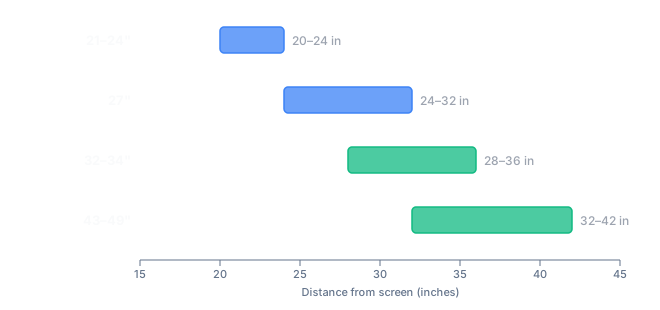
Viewing distance matters more than diagonal size alone. A common rule of thumb is roughly one inch of distance for every inch of diagonal size — a 24-inch monitor is comfortable at 20-24 inches, a 27-inch at 24-32 inches, and a 32-inch or larger panel needs 28-36 inches or more between your eyes and the screen. See exactly how these figures are worked out on the methodology page, or if you already know you want gaming-specific advice, see our best monitor size for gaming guide.
Frequently Asked Questions
What size monitor should I buy for a small desk?
A 21-24 inch monitor is the safest fit for a small or shallow desk, since it stays sharp and comfortable to view from as little as 20 inches away without overwhelming limited desk depth.
Is a 32-inch monitor too big for a normal desk?
Not if your desk is at least 28-30 inches deep. A 32-inch monitor needs roughly 28-36 inches of viewing distance to avoid excessive eye and neck movement, so measure your desk before buying.
How far should I sit from a 27-inch monitor?
About 24 to 32 inches away, measured from your eyes to the screen. That's roughly arm's length to arm's length plus a bit, which is why 27 inches remains the most common all-around size.
Does a bigger monitor always mean a better experience?
Not automatically. A monitor too large for your desk depth forces you to move your head to see the edges, which can offset any benefit from the extra screen space.