
Quick Answer
A 65-inch TV isn't just "a bit bigger" than a 55-inch — it has about 40% more screen area (1,806 in² vs. 1,293 in²) at the same 16:9 shape. At the same ratio, a 55-inch screen measures roughly 47.95" × 26.97"; a 65-inch measures 56.67" × 31.87" — about 8.7" wider and 4.9" taller. Choose 65-inch if your seating is 7 feet or farther away, or you want a genuine home-theater feel. Choose 55-inch if your room is smaller, seating is closer than 6 feet, or you're limited by console or wall-mount width.
Interactive Size Comparison
Numbers on a page only go so far — the free visualizer lets you overlay a 55-inch and 65-inch screen against your actual wall, TV stand, or furniture measurements, and see the difference to scale in your own space.
Open the size visualizer →Physical Dimensions
TV sizes are always measured diagonally, corner to corner, not by width or height. To get the actual footprint, we apply the Pythagorean theorem to each diagonal at the standard 16:9 aspect ratio virtually all 55-inch and 65-inch TVs use. A 55-inch screen works out to 47.95" wide × 26.97" tall; a 65-inch screen works out to 56.67" wide × 31.87" tall.
These are calculated screen dimensions, not bezel-to-bezel measurements — actual panel width can vary by a fraction of an inch between brands depending on bezel thickness, and "55-inch" or "65-inch" is a nominal class size that manufacturers round to, not a laser-measured exact figure. For planning wall space or a stand, treat these numbers as accurate to within about half an inch.
| Spec | 55" TV | 65" TV |
|---|---|---|
| Width | 47.95" | 56.67" |
| Height | 26.97" | 31.87" |
| Screen area | ~1,293 in² | ~1,806 in² |
| Aspect ratio | 16:9 | 16:9 |
55" vs 65" Side-by-Side
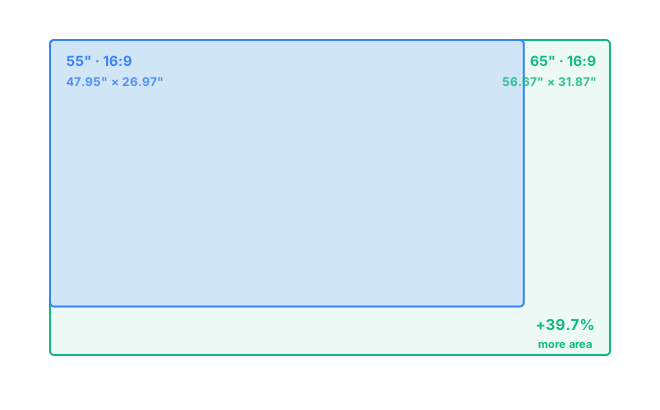
Placed corner-to-corner from the same starting point, the 65-inch extends about 8.7 inches farther to the right and 4.9 inches farther down than the 55-inch. That extra strip isn't trivial — it's roughly equivalent to adding a 9-inch-wide column of extra picture along one entire side, which is why the area difference (40%) feels much larger in person than the 10-inch jump in diagonal size suggests on paper.
Room Size & Viewing Distance
Screen size only works if your seating distance matches it — too close and you'll see individual pixels or have to move your eyes to take in the whole picture; too far and detail gets wasted. For sharp 4K content, a widely used guideline is a viewing distance of roughly 1 to 1.5 times the screen's diagonal size. That works out to about 4.5 to 7 feet for a 55-inch TV and 5.5 to 8 feet for a 65-inch TV.
If your couch or bed sits closer than these ranges, the larger screen can feel like it's looming rather than immersive. If your seating is farther — a larger living room, for instance — the 65-inch will fill more of your field of view and feel proportionate where a 55-inch might feel small on the wall. Try your own room distance in the comparison tool, or see how these dimensions are calculated on the methodology page.
Gaming & Home Theater
Screen size itself doesn't affect input lag or refresh rate — those depend on the TV's panel and processing, not its inches. What size does change is immersion and how much head movement you need. For fast-paced or competitive gaming at a closer distance (under 6 feet), a 55-inch keeps the whole screen in your natural field of view without needing to glance side to side. For movies, sports, and couch gaming from farther back, a 65-inch delivers a more cinema-like sense of scale, especially in a dedicated media room.
If you split time between both, prioritize your actual seating distance over which size "sounds" more impressive — a 65-inch that's too close for comfortable gaming will do neither job well.
Resolution Considerations
Nearly all 55-inch and 65-inch TVs sold today ship with 4K (3840×2160) resolution as standard; 8K exists but is still uncommon and mostly reserved for premium 65-inch-and-up models. Because the 65-inch spreads the same 4K pixel count over more screen area, its pixel density is lower — about 68 pixels per inch versus roughly 80 PPI on the 55-inch. In practice this rarely matters: at the viewing distances above, neither size lets your eye resolve individual pixels, so both look equally sharp. It becomes relevant only if you plan to sit unusually close, where the 55-inch's tighter pixel density holds up slightly better.
Which One Should You Choose?
Pick the size based on your room, not your budget alone — a 65-inch on sale is still the wrong choice if your couch is 5 feet from the wall. Go 65-inch if you have at least 6 to 7 feet of seating distance, a living room used for movies or group viewing, and wall or stand space to spare. Go 55-inch if your room is smaller, seating is closer than 6 feet, it's going in a bedroom or secondary room, or you're working with a narrower media console. Both sizes are readily available at similar price-per-inch, so cost is rarely the deciding factor — fit and distance are.
Frequently Asked Questions
How much bigger is a 65-inch TV than a 55-inch TV?
A 65-inch TV is about 8.7 inches wider and 4.9 inches taller than a 55-inch TV at the same 16:9 ratio, which works out to roughly 40% more total screen area — noticeably bigger, not just a small step up.
What is the best viewing distance for a 65-inch TV versus a 55-inch TV?
For 4K content, a comfortable range is roughly 4.5 to 7 feet for a 55-inch TV and 5.5 to 8 feet for a 65-inch TV. If your regular seating is closer than that, the smaller screen will feel more proportionate; farther than that, the 65-inch fills your field of view better.
Will a 65-inch TV fit where a 55-inch TV used to be?
Usually yes on a stand, but check your existing wall mount and console width first — a 65-inch TV needs about 8.7 inches more shelf or wall width and 4.9 inches more height than a 55-inch model.
Is 65 inches too big for a bedroom?
It depends on how far the TV sits from the bed. If your viewing distance is under about 5.5 feet, a 65-inch screen can feel oversized up close; a 55-inch is usually the more comfortable fit for typical bedroom distances.